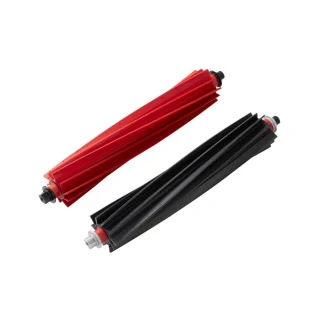
Robot vacuum main brush
Roborock Rubber Main Brush (S8 MaxV Ultra / S8 Max Ultra)
8.02.0322
Fits 2 models · replace every 12 months
Wrong part, or your model missing? Tell us. A person checks every report.
GenuineGenuine Roborock
See seller
Sold by Roborock and retailersSold by Roborock and retailers
CompatibleCompatible option
See seller
No compatible seller tracked yetNo compatible seller tracked yet
Genuine: made by Roborock. Compatible: another brand. Check certification on the seller's page.Genuine is made by Roborock. Compatible is made by another brand. Check the seller's certification details before choosing.
Sellers
AUD, before delivery. Each price shows when it was checked.
No Australian seller lists this part right now. Roborock's Australian store has unpublished this part (page 404, 2026-09-28); no Australian seller found. Search the part code 8.02.0322 at your usual retailer.
How long it lasts
Usually every 12 months. The app reminds you when it is due.
After replacing: Reset the main-brush timer under Maintenance in the Roborock app.
Not due yet?
Get a nudge when your filter is due — it's every 12 months. One email two weeks before, no newsletter. Manage or stop it anytime.
How to change the 8.02.0322 main brush
Watch the guide or follow the steps.
- 1Turn the robot over on a towel. The main brush is the roller in the middle behind a cover with two tabs.
- 2Squeeze the tabs, lift the cover off, and lift the old roller out from the end away from the gear.
- 3Drop the new roller in with the gear end matching the old one, press the cover back until both tabs click.
- 4Reset the main-brush timer under Maintenance in the Roborock app.
Every number this part goes by
- Retail name:
- 8.02.0322
Sellers list any of these; they are the same part.
Will it fit your appliance?
Type your model number and we'll check it against the makers' lists.
Fits these 2 Roborock models
Roborock2 models
Common questions
- Which main brush fits the Roborock 8.02.0322?
- The Roborock 8.02.0322 takes the Roborock Rubber Main Brush (S8 MaxV Ultra / S8 Max Ultra) (part 8.02.0322).
- How often should I replace the main brush in my Roborock 8.02.0322?
- Every 12 months, or sooner if it looks worn.
- How do I fit the 8.02.0322 in a Roborock 8.02.0322?
- No tools, a few minutes: 4 steps, listed on this page with the replacement video where the maker has one.
- What happens if I don't change it?
- A clogged filter loses suction, worn brushes miss edges, and a stale mop cloth smears rather than cleans.
- How do I reset the reminder?
- Reset the main-brush timer under Maintenance in the Roborock app.
Something looks wrong with the 8.02.0322 match? . Reports go to a person, not a bot.